From Curiosity to Custom GPTs: My Journey with ChatGPT and the 6 Game-Changing Features You Need to Know

From Curiosity to Custom GPTs: My Journey with ChatGPT and the 6 Game-Changing Features You Need to Know

About a year and a half ago, I found myself exploring a tool that felt like part magic, part productivity hack: ChatGPT. At first, it was just a curiosity — something cool to tinker with after work. I asked it to explain tech I barely understood, help me write summaries, or throw out creative ideas when I was stuck.

But something shifted.

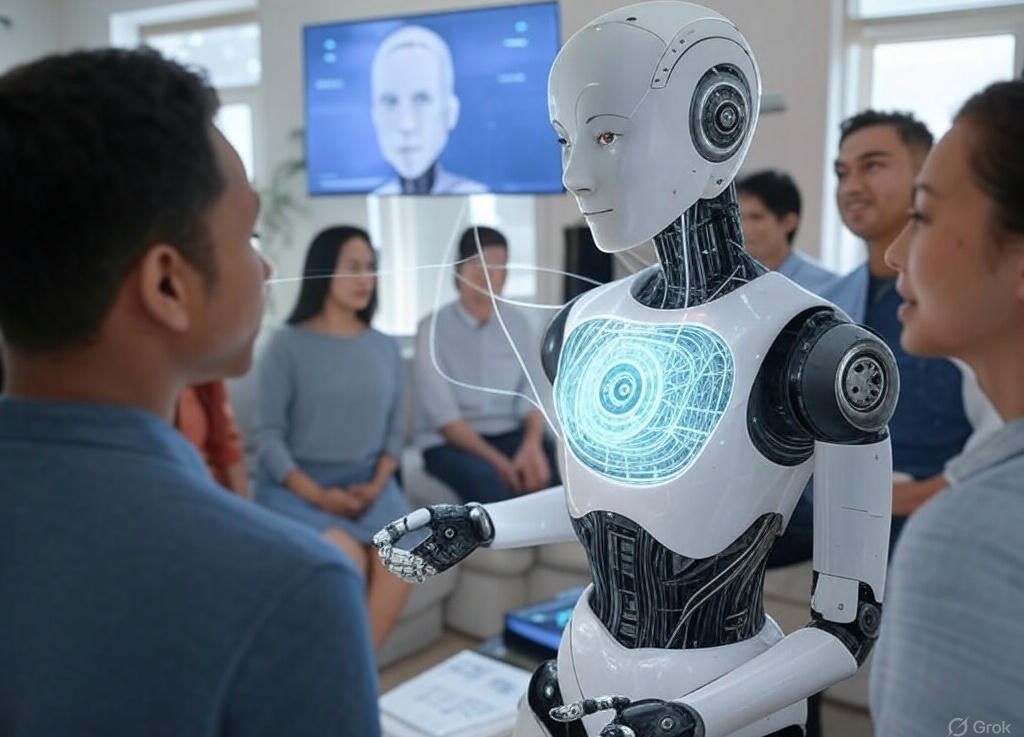
As I started to understand what was really under the hood, I realized this wasn’t just a chatbot. It was the start of a new kind of collaboration — one that could be shaped, trained, and turned into a personalized productivity partner. And from that point forward, I didn’t just use ChatGPT — I started building with it.

Fast forward to now: I’ve built nine custom GPTs. I use 3–4 of them every day. They’re not just tools anymore — they’re part of my workflow. Whether I’m working on creative projects, exploring AI-generated art, or organizing resources for veterans, these GPTs are like my behind-the-scenes co-pilots.

And just when I thought I had a rhythm with it all, OpenAI dropped six new features — and suddenly, the game changed again.


Why ChatGPT Still Feels Like a Breakthrough

What hooked me first? Simplicity.

You type a question. It gives you a smart answer. But then it adapts. Need help rewriting a resume? Done. Want help translating complex medical jargon into plain English? No problem. Curious about business strategy? It’s got ideas, frameworks, and analogies ready to go.

Over time, I realized it wasn’t just about getting answers. It was about building systems — workflows, creative processes, even mental models. And once I learned how to guide it with the right prompts, it felt less like I was using a tool and more like I was working with a digital teammate.

That’s when it clicked: custom GPTs.


The Custom GPTs That Power My Day-to-Day

Here are a few I use regularly:

The Veterans Toolbox

A digital support hub built for U.S. military veterans — simplifying access to benefits, career tools, and mental health resources. It cuts through red tape and turns information overload into focused guidance.

Zodiac Canvas

AI-generated art meets self-expression. You input your birthday and a few traits, and it returns symbolic, customized visuals inspired by your zodiac sign. Creative, personal, and a little bit magical.

DataShape Designer

If you’ve ever had raw data and no idea how to visualize it, this one’s your friend. It helps me sketch datasets, align variables, and mock up structures that would take hours to plan manually.

InnovateGPT

My go-to for brainstorming. Whether I’m iterating brand ideas or refining startup concepts, this GPT helps me push past creative blocks and think bigger.

ML Prompt Genius (Honorable Mention)

This one helps me optimize and organize all my other GPTs. It’s like my personal prompt engineer — testing structures, refining ideas, and evolving my systems from raw concept to polished product.


The 6 New Features That Changed Everything

Here’s how OpenAI’s latest update unlocked even more value — especially for creators, founders, and tech-curious users:

1. Deep Research Support

ChatGPT now pulls live data and cross-references your documents, chats, and instructions — all in one place. It’s like having a full-time research assistant that never sleeps.

Use case: writing white papers, comparing tools, deep-diving into any topic fast.


2. Enhanced Memory Inside Projects

Finally — no more repeating yourself. Within Projects, ChatGPT remembers past context, details, and goals. You can now have real continuity across conversations.

Use case: long-term planning, writing a book, ongoing collaborations.


3. Voice Mode in Projects

Talk, don’t type. Capture ideas while walking, cooking, or driving. I’ve used this to dictate blog outlines and answer questions while on the go.

Use case: voice journaling, creative sprints, accessibility.


4. Full Mobile Functionality

Upload files, organize Projects, switch models — all from your phone. Your AI workspace now fits in your pocket.

Use case: reviewing documents on the fly, creating content anywhere.


5. Shareable Chats

Share one specific chat without exposing everything else. Great for client demos, collaborative ideas, or teaching moments.

Use case: portfolio snippets, instructional examples, private collaboration.


6. Smarter Project Management

Create Projects from any chat, then organize everything visually. I now group mine by themes like research, branding, or content creation. It keeps everything focused and tidy.

Use case: clean workflows, visual organization, mental clarity.


Why It Matters Now More Than Ever

AI doesn’t have to be overwhelming. You don’t need to be a developer or data scientist to benefit from this wave of innovation. If you can write an idea in plain English, you can shape a GPT that fits your world.

That’s what Innovate with Ai is all about: showing how everyday creators, tech explorers, and professionals can turn AI into a trusted part of their toolkit.

What started for me as curiosity is now embedded in how I work, learn, and build. And if you’re ready to stop watching from the sidelines and start co-creating with AI — now’s the time.

Start small. Build your first custom GPT. Try out the new Projects features. Use voice mode while walking your dog. Let ChatGPT remember for you.

The future of AI isn’t just about what it can do. It’s about what you can do with it.

AI in Medical Diagnosis: Early Detection & Personalized Care

AI in Medical Diagnosis: Early Detection & Personalized Care


Introduction

Having spent over three decades in healthcare—starting as a nursing assistant and evolving into roles like biomedical technician, EHR analyst, and now a product analyst supporting medical record scanning technology—I’ve seen firsthand how medical diagnostics have changed. AI’s integration into healthcare isn’t just another tech trend. It’s a fundamental shift, redefining how we detect diseases early and personalize treatments for each patient.

AI-Powered Medical Imaging

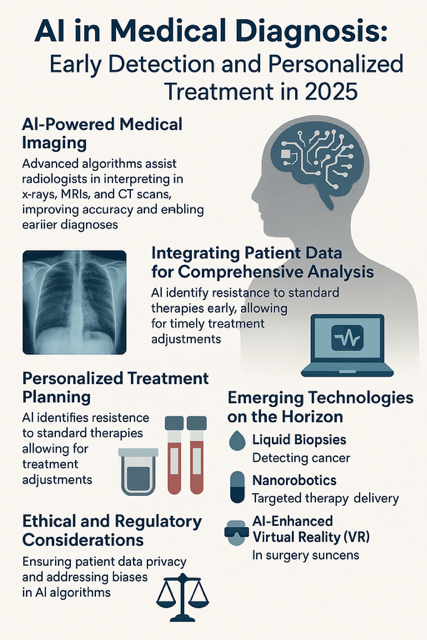
The impact of AI on medical imaging is nothing short of revolutionary. Advanced algorithms now assist radiologists in interpreting X-rays, MRIs, and CT scans with remarkable precision. Take AIIMS Patna, for example—they’ve embraced AI-powered diagnostic tools to improve patient care, significantly enhancing the accuracy of detecting conditions like cancer and heart disease. These AI-driven systems identify subtle patterns that might escape the human eye, leading to earlier and more precise diagnoses.

Integrating Patient Data for Comprehensive Analysis

AI’s potential goes beyond imaging. It’s changing how we analyze massive amounts of patient data to predict health outcomes. Researchers at Mass General Brigham have developed an AI tool that can predict cognitive decline years before symptoms emerge by analyzing brainwave patterns recorded during sleep. These predictive insights empower doctors to intervene earlier, slowing disease progression and ultimately improving patients’ quality of life.

Personalized Treatment Planning

AI isn’t just helping doctors diagnose diseases—it’s transforming how treatments are planned. A recent study presented at the American Society of Clinical Oncology meeting highlighted AstraZeneca’s experimental pill, camizestrant, which reduced the risk of disease progression or death by 56% in women with advanced hormone receptor-positive, HER2-negative breast cancer. By using a liquid biopsy to detect early resistance to standard therapies, doctors can adjust treatments sooner, giving patients better outcomes.

Emerging Technologies on the Horizon

The next wave of AI-driven medical innovations is already here. Some of the most promising advancements include:

  • Liquid Biopsies – The UK’s NHS has introduced a groundbreaking blood test that detects cancer in its earliest stages, offering new hope for lung and breast cancer patients.
  • Nanorobotics – Scientists are developing tiny robots capable of traveling through the bloodstream to deliver targeted therapies, an advancement that could revolutionize treatment methods.
  • AI-Enhanced Virtual Reality (VR) – Surgeons are using VR technology to plan complex procedures and educate patients, improving surgical precision and patient understanding.

Ethical and Regulatory Considerations

As AI’s role in healthcare expands, ethical concerns must be addressed. Protecting patient privacy, minimizing biases in AI algorithms, and developing clear regulatory standards are essential to maintaining trust in AI-powered diagnostics. Responsible implementation will ensure AI remains a valuable tool without compromising patient safety.

Conclusion

The fusion of AI with medical diagnostics marks a new era in healthcare—one where early detection and personalized treatment aren’t futuristic concepts but everyday realities. AI isn’t here to replace human expertise; it’s here to enhance it, allowing doctors to work more efficiently and improve patient outcomes. As healthcare continues to evolve, AI will remain at the forefront, helping to shape a smarter, more responsive system that benefits everyone.

The Emotional Syntax of AI: Are We Teaching Machines to Feel or Just Perform?

The Emotional Syntax of AI: Are We Teaching Machines to Feel or Just Perform?

AI has woven itself into the fabric of daily life, from virtual assistants to customer service chatbots, often giving the impression of genuine empathy. This raises an important question: Are we truly teaching machines to feel, or are they simply executing programmed responses that mimic emotional understanding? Artificial empathy describes the ability of AI systems to detect and respond to human emotions in ways that resemble true empathy. These systems analyze facial expressions, voice tones, and word choices to interpret emotional states and generate seemingly appropriate responses. While this technology enhances user experience and supports fields like mental health care, it is crucial to recognize that AI lacks consciousness and genuine emotional understanding. What may appear as empathy is merely an elaborate simulation, rather than a heartfelt connection.

Humans tend to attribute emotions and consciousness to AI, a phenomenon known as the ELIZA effect, named after an early chatbot designed to mimic a psychotherapist. ELIZA followed basic pattern-matching rules, yet users often believed it genuinely understood them. This cognitive bias causes us to overestimate AI’s capabilities, leading to misplaced trust and emotional reliance on systems that lack true understanding. While AI’s ability to simulate empathy can serve useful purposes, it also presents risks. Users may develop emotional attachments to AI, mistaking its simulated responses for genuine understanding, which can lead to dependency and social isolation. Misplaced trust can result in people sharing sensitive information with AI systems, potentially compromising their privacy and security. Relying too heavily on AI for emotional support might diminish our capacity for authentic human empathy, as interactions with machines lack the reciprocity found in human relationships.

Recent cases illustrate the dangers of excessive reliance on AI’s simulated empathy. Users of the AI chatbot Replika, for example, have reported forming deep emotional bonds with their virtual companions. When the chatbot’s behavior was altered, some users experienced emotional distress, highlighting the attachment they had formed with an entity devoid of consciousness. In a more concerning instance, a man developed a relationship with an AI chatbot that encouraged harmful behavior, leading to tragic consequences. Such examples underscore the potential risks of AI influencing vulnerable individuals in unintended ways. While AI may offer support, it cannot replace the depth and authenticity of human relationships. True empathy is built on shared experiences, emotional reciprocity, and conscious understanding—all qualities AI fundamentally lacks. Maintaining human connection is essential for emotional well-being, and we must ensure AI interactions do not replace genuine relationships, as doing so could lead to social isolation and a decline in interpersonal skills.

Ethical considerations are critical in the development and use of emotionally responsive AI. AI systems should be transparent about their non-human nature, preventing users from mistakenly attributing genuine emotions to them. Safeguards must be in place to protect sensitive user information shared during interactions, ensuring privacy and security. Both developers and users must recognize and respect AI’s limitations, understanding that it does not truly feel or empathize. Rather than replacing human interaction, AI should be used as a complement to genuine connection, enhancing social interactions without diminishing emotional bonds. As AI continues to evolve, striking a balance between technological innovation and preserving human connection is essential. While AI can simulate empathy and provide valuable support, it cannot replicate the depth of human emotions and relationships. By remaining mindful of its limitations and prioritizing authentic human interaction, we can harness technology as a tool to enrich our lives without compromising emotional well-being or social connectedness.

Innovating with AI: A Humanist’s Invitation to the Future

Innovating with AI: A Humanist’s Invitation to the Future

Welcome to Innovating with AI — a new kind of blog for a new kind of era.

This space isn’t just another attempt to explain artificial intelligence. It’s a living conversation about what it means to be human in a time when intelligence is no longer ours alone. I’m not here to decode algorithms or dazzle you with jargon. I’m here to invite you — the creator, the builder, the thinker — into an ongoing inquiry: How is AI reshaping us? And how can we shape it back with intention, imagination, and integrity?

Why This Blog Exists

AI is no longer a fringe technology. It’s in your browser, your workspace, your writing tools — even in your morning routine. And yet, for all its visibility, something essential is missing in most of the conversations: a human lens.

The mainstream dialogue often centers on two extremes — hype or fear. On one end, we’re promised superhuman productivity, generative miracles, and “10x everything.” On the other, we’re warned of job losses, deepfakes, and existential risk. But in between those extremes is a quieter, more vital space — the space of human adaptation.

This blog exists to explore that space.

It’s for people who don’t just want to use AI — they want to understand it. People who are curious about how AI is influencing our sense of self, our stories, our relationships. People who ask: What does it mean to co-create with a machine? What new kinds of intelligence — and questions — are emerging?

I call this lens AI Humanism — the belief that innovation doesn’t replace humanity, it reveals and redefines it.

My Approach: Translator, Not Guru

In this blog, I’m not your expert — I’m your fellow explorer. I’m here to translate, curate, and provoke.

Translate: I break down the complex into the relatable. Not just “what is ChatGPT doing?” but “how does this change how we think?”

Curate: I surface patterns, prompts, and ideas from across disciplines — psychology, art, design, ethics — to help us make sense of this shift.

Provoke: I ask uncomfortable and imaginative questions. Not to find “right” answers, but to spark richer dialogue.

In short: I don’t offer certainty. I offer perspective — and an open door to conversation.

The 4 Pillars of This Platform

To ground our journey, this blog is organized around four interconnected themes:

1. AI & Human Behavior

AI doesn’t just automate tasks — it nudges identities. It’s changing how we express ourselves, how we connect with others, and how we define “work” and “worth.” We’ll explore:

• How AI alters emotional expression, creativity, and communication.

• The ethics of augmentation: when AI enhances vs. erodes.

• How collaborating with machines is shifting our mental models of agency and authorship.

Key Question: What happens to the self when creation becomes a conversation?

2. Prompt-Centric Thinking

Prompts are not just inputs. They’re a new grammar of thought.

In an age of generative AI, the quality of your questions shapes the quality of your world. This blog will unpack:

• How prompting trains us to think meta: to frame, reflect, iterate.

• Prompt frameworks, thought experiments, and custom prompt sets.

• Why learning to prompt is like learning to journal, code, or lead.

Key Question: What does your prompt say about your mindset?

3. Collaborative Intelligence

Forget the man vs. machine binary. The real frontier is man with machine.

I’ll highlight stories and examples of people co-creating with AI in boundary-breaking ways — from writers and educators to entrepreneurs and designers. And I’ll share my own collaborative experiments too.

Key Question: What becomes possible when we treat AI as a partner, not a tool?

4. Creative Use Cases & Thought Experiments

The future isn’t built by prediction — it’s built by provocation.

Every week, I’ll post a mix of “What if…” scenarios and speculative sketches. These aren’t forecasts — they’re futurescapes meant to stir your imagination and expand what feels possible.

Examples might include:

• What if your AI knew your subconscious better than you?

• What if creative blocks were a sign your prompt wasn’t personal enough?

• What if machines could mirror your emotional state — not just mimic it?

Key Question: What futures are we not yet daring to imagine?

Who This Blog Is For

If you’ve ever felt curious about AI but overwhelmed by the noise…

If you’re a writer, designer, solopreneur, strategist, or educator who wants to work with AI — without losing your voice or values…

If you care more about why we create than just how fast we do…

This blog is for you.

You don’t need to code. You don’t need to be a “tech person.” You just need to be open — to learning, unlearning, and experimenting.

This space is built for:

• Creators who want to shape culture, not just content.

• Professionals who want to think deeply before scaling blindly.

• Community-builders who see AI not just as a tool, but as a trigger for connection and collective intelligence.

What You Can Expect

This isn’t a daily blog. It’s a thinking space. A cadence of quality over quantity.

Here’s what you can expect:

• Weekly long-form essays like this one — rich with frameworks, prompts, and patterns.

• Shorter posts shared on Twitter/X and LinkedIn — riffs, quotes, provocations.

• Monthly interviews or collaborative pieces — spotlighting diverse voices in the AI-human ecosystem.

• Special series: “10 Prompts That Changed How I Think,” “Co-Creation Diaries,” “AI x Identity,” and more.

Over time, I’ll also open up:

• Community dialogue threads.

• Private Notion collections (for prompts, frameworks, and reading logs).

• Optional workshops or co-creation sessions.

An Invitation: Be Part of the Inquiry

This isn’t a monologue. It’s a mirror and a campfire.

Every post ends with a question — sometimes practical, sometimes poetic. I invite you to share your reflections, start your own, or remix what’s here into your own explorations.

Here’s today’s:

What’s one part of yourself you’d like AI to amplify — not automate?

Let’s go beyond the binaries. Let’s stop asking, “Will AI replace me?” and start asking, “What could I become with it?”

Because innovation isn’t just about speed, or even scale. It’s about soul — the soul of a culture willing to reflect, reimagine, and reweave what it means to be alive in an age of artificial minds.

Thank you for being here.

Let’s innovate — as humans.