ChatGPT now keeps working after you close the tab. That’s the pitch behind dots, the always-on agents OpenAI announced on September 29, 2026. I went down the rabbit hole on this one so you don’t have to. Here’s what’s real, what’s still fuzzy, and how I’d use ChatGPT dots in a one-person business without letting one run my reputation.
What ChatGPT dots actually are
Per OpenAI’s own announcement, a dot is an “always-on agent” inside ChatGPT. It gets its own cloud computer and browser, can connect to the apps you authorize, and can keep making progress between conversations instead of waiting for you to type something.
The parts that matter for a solo founder, all from OpenAI’s announcement and help center:
- It runs on a schedule. You can set reminders and recurring tasks, like reviewing your calendar each morning.
- It works in the background. It can research and suggest ways to help when you’re not in the chat. OpenAI says this proactive research uses apps in read-only mode, so it can’t send messages or change things while it’s poking around.
- You can talk to it. OpenAI says you can hop on a voice call with your dot. The help center adds that your dot can’t call you at launch.
- It follows rules you set. Custom Rules let you mark actions as “take action without asking,” “ask before taking action,” or “hand off to you.” Some sensitive tasks, like changing a password, always stay with you.
- You can pause it. There’s a pause option in the dot’s profile and an activity view that shows what it’s been doing.
Who can use it right now
This is where the hype outruns the fine print. At launch, OpenAI says dots are rolling out to ChatGPT Pro and Business Premium users in eligible markets. Pro access excludes the EEA, Switzerland and the UK. Enterprise workspaces can try a beta, but it’s off until an admin turns it on. Rollout is gradual, so access “may take several days.”
OpenAI says your first dot is included in Pro or Business Premium “at no extra cost,” and that dot usage won’t count against plan allowances for the first month. After that, OpenAI says it will “share usage terms for each plan.” Those terms weren’t published on the pages I checked. Treat any long-term cost as UNVERIFIED until OpenAI posts it.
A couple of other limits: you create a dot from the desktop app or desktop web, not mobile. Access to your local computer is optional and starts turned off.
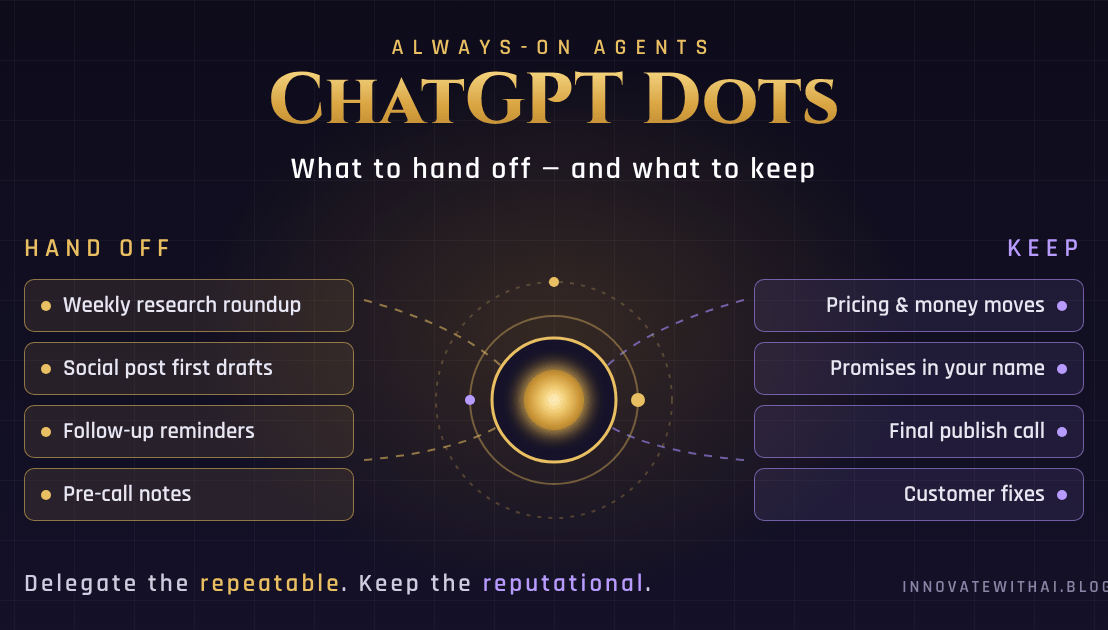
Delegate the repeatable, keep the reputational
Here’s my GenX rule of thumb for any agent, dots included: delegate the repeatable, keep the reputational.
Good jobs to hand off:
- A weekly research roundup on your niche or competitors
- First drafts of social posts from a transcript or blog post
- Follow-up reminders and “did this ever get done?” checks
- Pulling notes together before a call
Jobs to keep:
- Pricing and anything involving money moving
- Anything that makes a promise with your name on it
- The final call on what gets published
- Replies to customers when something went wrong
The first list is boring, repetitive work where a decent draft saves you an hour. The second list is where one bad call costs you trust. An agent doesn’t care about your reputation. You have to.
Why “always-on” cuts both ways
A chatbot that makes a mistake makes it once, while you’re watching. An agent that runs unattended on a schedule can make the same mistake every day until somebody notices. That’s not a knock on OpenAI. Its own announcement says “Dots can still make mistakes, so always review consequential work,” and the help center says a dot can make mistakes “including when following your rules.”
So the real job isn’t building the agent. It’s building the review step around it.
For what it’s worth, I run my own content agents on Claude, and they all feed one review queue. Nothing goes public until I’ve looked at it and approved it. The specific tool matters less than that habit. Whether you use dots, Claude, or something else, the setup that works is “agent drafts, human approves.”
What to do this week
- Check if you even have access. Look in ChatGPT on desktop. If you’re on Plus or Free, dots aren’t for you yet, and paying for Pro just to test them is a call to make once OpenAI publishes the post-trial usage terms.
- Write your “delegate vs. keep” list before you build anything. Take 15 minutes and list five recurring tasks. Mark each one repeatable or reputational. Only the repeatable ones go to an agent.
- Set “ask before taking action” as your default. If you do set up a dot, start strict with Custom Rules and loosen up only after a couple of weeks of watching what it does. Put a weekly 20-minute review on your calendar to check its activity view.
GenX reality check
- Pricing after the first month is unknown. OpenAI hasn’t published post-trial usage terms on the pages I reviewed. Don’t build a business process around a cost you can’t see yet.
- Coverage is limited. Pro and Business Premium only, with regional exclusions for Pro. If your audience is in the UK or EU, they may not be able to follow along.
- Connected apps mean connected risk. A dot with access to your email and files can act on them. OpenAI notes that disconnecting an app doesn’t delete data the dot already pulled. Connect only what the job needs.
- Secondhand coverage runs ahead of the facts. A lot of the early coverage (including the article that sent me down this hole) is opinion, not documentation. Read OpenAI’s own pages before you change how you work.
- The details will change. OpenAI has already updated the announcement once since launch. Re-check before acting on anything here.
Sources
- OpenAI, Introducing dots (Sept. 29, 2026, updated Nov. 3, 2026)
- OpenAI Help Center, Getting started with your dot
- Entrepreneur, The Biggest ChatGPT Update Yet Gives Entrepreneurs 7 New Ways to Grow Their Business Fast (contributor opinion piece)
Want the full agent setup?
If you want to set up AI agents with a review step built in, my guide Prompt Empire: Build an Army of AI Agents walks through it. Get Prompt Empire: AI Agents ($9.99+) on Gumroad.